Lesson Types
Overview
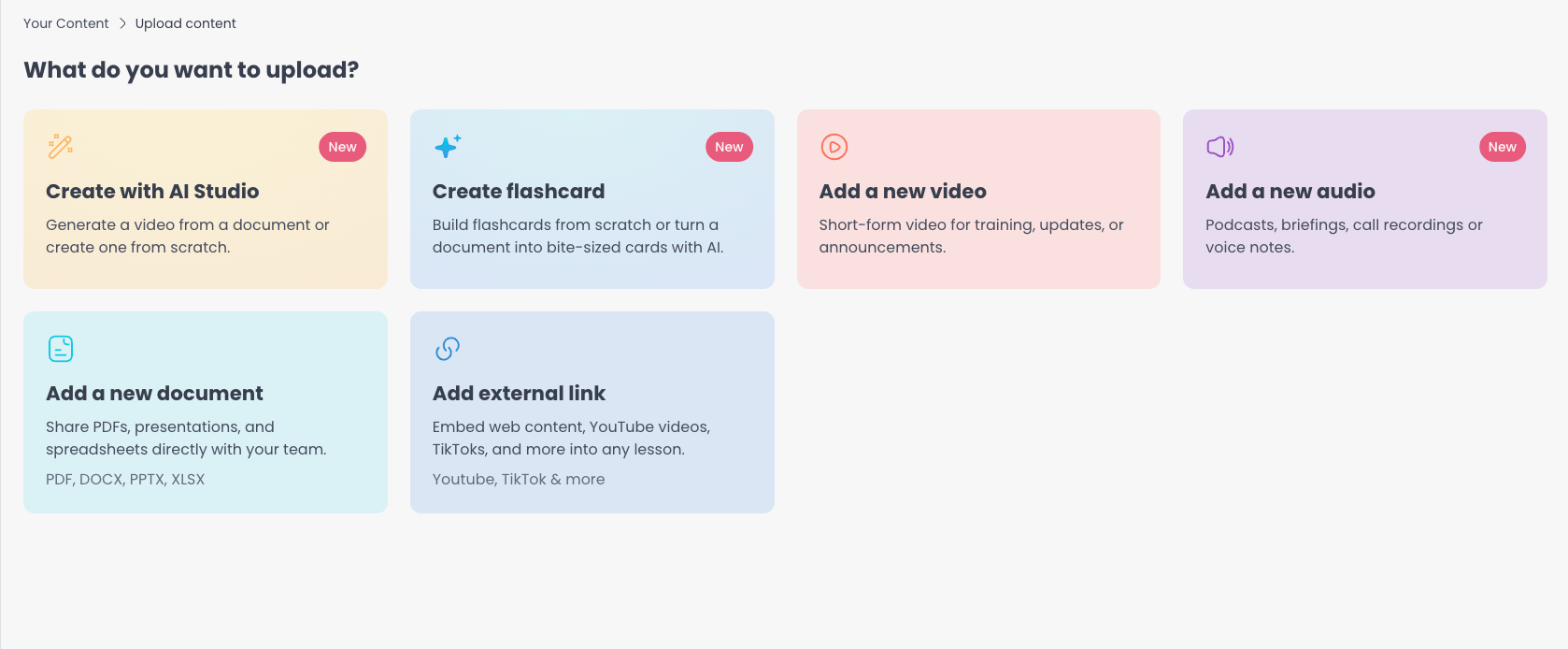
5mins.ai supports several content types to help you create diverse and engaging learning experiences:
Video Lessons - Upload and share training videos
Audio Lessons - Upload podcasts, narration, and other audio
PDF Lessons - Share documents and reading materials
External Links - Embed web content into your training
Flashcards - Build interactive study cards, either from scratch or automatically from a file using the AI Transformer
Each content type serves different learning objectives and can be combined to create comprehensive courses that accommodate various learning styles.
AI Transformer
What is AI Transformer?
The AI Transformer is one of the two ways to create a flashcard lesson. Instead of building cards from scratch, you upload existing content (a PDF, Word, PowerPoint, video, or audio file) and the AI Transformer drafts a set of flashcards for you. You then review and edit every card in the flashcard editor before publishing.
For how flashcards work once they're drafted (rich text, images, backgrounds, and themes), see Flashcards Lessons: https://help.5mins.ai/articles/7616262-flashcards-lessons
Best Use Cases:
Converting lengthy policy documents into digestible chunks
Creating quick review sessions
Breaking down complex topics into manageable chunks
Generating interactive content from existing resources
Video Lessons
Overview
Video lessons are ideal for visual learners and practical demonstrations. They're particularly effective for training content that benefits from visual explanation or step-by-step guidance.
When to Use Video Lessons:
Software tutorials and demonstrations
Process explanations
Expert interviews
Product showcases
Interactive presentations
Video Guidelines
Technical Specifications:
Supported Formats: .mp4, .mkv, .m4v, .mov
Maximum File Size: 1GB per video
Recommended Resolution: 720px x 1200px
Vertical (portrait) videos with an aspect ratio of 9:16 are preferred.
Horizontal videos will have padding on top and bottom to fit in portrait mode
Content Best Practices:
Keep it Focused: Aim for 5-15 minutes per video lesson
Clear Audio: Ensure narration is clear and well-paced
Visual Quality: Use good lighting and stable footage
Engagement: Include interactive elements or calls-to-action
Accessibility: Consider adding captions for better accessibility
Upload Process:
Select "Add a new video" from upload options
Choose your video file or drag and drop
Add a video title
Save and publish video lesson
Audio Lessons
Overview
Audio lessons are ideal for podcasts, recorded narration, interviews, and any content that works well as listen-only learning. Learners play audio lessons directly in the platform with the same progress tracking as video.
When to Use Audio Lessons:
Podcast-style discussions and interviews
Recorded narration and audiobooks
On-the-go learning where a screen isn't needed
Technical Specifications:
Supported Formats: .mp3, .wav, .m4a, .aac
Maximum File Size: 250MB per audio file
Audio Quality: Use a clear recording free from background noise, mic pops, or distortion
PDF Lessons
Overview
PDF lessons are perfect for sharing documents, guides, presentations, and reading materials that learners can reference and download.
When to Use PDF Lessons:
Reference guides and manuals
Reading assignments
Worksheets and templates
Compliance documents
PDF Guidelines
Technical Specifications:
Supported Formats: PDF, PowerPoint (.ppt, .pptx), Word (.doc, .docx), and Excel (.xls, .xlsx). All non-PDF files are converted to PDF on upload.
Maximum File Size: 25MB per document (under 10MB is recommended for best rendering performance)
Page Limit: No strict limit, but consider learner experience
Recommended Page Size: 1080x1920 (portrait, 9:16)
Formatting Recommendations:
Headers: Use clear, descriptive headers and subheaders
Bullet Points: Break up dense text with bullet points and lists
Visual Elements: Include relevant images, diagrams, and charts
White Space: Use adequate spacing for better readability
Consistency: Maintain consistent formatting throughout
Upload Process:
Click "Add a new document" from upload options
Select your PDF file
Add lesson title
Save and publish PDF lessons
External Links
Overview
External links allow you to embed web content directly into your training, making it seamless for learners to access external resources without leaving your course environment.
Common External Link Sources:
YouTube , Synthesia, and LoomVideos
Educational content and tutorials
Expert talks and presentations
Product demonstrations
Webinar recordings
Blogs and Articles:
Industry insights and trends
How-to guides and tutorials
Case studies and research
Thought leadership content
Please note - For synthesia, users have to click on Published button and click on ‘Copy video link’
For loom, click on share button and then click on Copy Link
Flashcards
Overview
Flashcards are their own lesson type, separate from videos and PDFs. Each flashcard lesson is a set of interactive study cards with a rich-text title and summary, and you can add a theme, a background image, or a foreground image to each card. You can build flashcards from scratch in the editor, or use the AI Transformer to turn an existing document, video, or audio file into a flashcard lesson automatically. Learners swipe or click through the card set, and the lesson is marked complete once they reach the end.
For the full walkthrough (building from scratch, rich-text formatting, images, backgrounds, and themes), see Flashcards Lessons: https://help.5mins.ai/articles/7616262-flashcards-lessons
Frequently Asked Questions (FAQs)
General Questions
Can I combine different lesson types in a course?
Yes! Mixing different content types creates more engaging and comprehensive learning experiences. Consider using videos for demonstrations, PDFs for reference materials, and external links for additional resources.
Is there a limit to how many lessons I can add?
There's no strict limit on the number of lessons per course. However, we recommend organizing content logically and considering the overall course duration for optimal learner engagement.
Can learners download the content?
Downloads are off by default. When an admin turns on downloads for your account, learners get a Download button on video, audio, and PDF lessons that your organisation has uploaded. Curated 5Mins library content can never be downloaded, and external links and flashcards are not downloadable.
AI Transformer Questions
What file types does AI Transformer support?
AI Transformer works with most common document formats including PDF, Word documents, PowerPoint presentations, video files, and audio files.
How accurate is the AI-generated content?
The AI Transformer is highly accurate but should be reviewed before publishing. You can edit and customize all generated flashcards to ensure they meet your specific requirements.
Can I edit the flashcards after they're generated?
Yes, you have full control to edit, add, or remove flashcards after the AI generates them. You can also add images to the flashcards.
Video Questions
Why is my video taking a long time to upload?
Upload time depends on file size and internet speed. Videos over 100MB may take several minutes. Consider compressing large files before uploading.
Can I add captions to my videos?
No, you cannot add caption to your videos. Please contact support@5mins.ai for such requests.
Q: What should I do if my video format isn't supported? A: Convert your video to MP4 format using free tools like HandBrake or online converters before uploading.
PDF Questions
Why does my PDF look different after uploading?
Some formatting may change during upload. Preview your PDF after uploading and consider optimizing the original file if needed.
Are password-protected PDFs supported?
No, passport protected PDFs are not supported.
External Link Questions
What happens if an external link breaks?
Learners will see an error message. Regularly check your external links and update them as needed. Consider adding backup content for critical resources.
Can I track if learners have visited external links?
Learners can complete external links by marking the links as completed. This data can be seen in the admin course reports section or learning records section
Do external links work on mobile devices?
Most external links work on mobile, but some content may not be optimized for mobile viewing.
Troubleshooting Common Issues
Upload Problems:
File too large: Compress your file or break it into smaller segments
Unsupported format: Convert to a supported format before uploading
Slow upload: Check your internet connection and try uploading again
Display Issues:
Content not loading: Clear browser cache and try again
External links not working: Verify the URL is correct and the content is publicly accessible
Getting Help
If you encounter issues not covered in this guide:
Check our Knowledge Base: Search for specific error messages or issues
Contact Support: Email us at support@5mins.ai with detailed information about your issue
Use Live Chat: Access our help chat feature within the platform
Need additional help? Contact our support team at support@5mins.ai or use the help chat feature within your admin dashboard.