Using the Marketplace 🛒
What is the Marketplace 💎
The Marketplace is where you can use your earned jewels (bonus points) to access additional learning resources and make charitable donations. You'll find three main categories to explore: Upskill, Rewards, and Donate.
💎 Your Jewels Balance
At the top of the Marketplace, you can always see your current jewels balance. These are the bonus points you've earned through consistent learning streaks and daily engagement with content.
Marketplace Categories 📂
When you visit the Marketplace, you'll see filter tabs — an "All" tab (selected by default) that shows everything, plus tabs for Rewards, Upskill, and Donate:
📚 Upskill
The Upskill section provides additional learning resources beyond your regular content:
External Training Courses You can explore external training courses that complement your internal learning. These are curated third-party courses from professional training providers that expand your learning options beyond what's available in your organization's content library.
Books You can browse a selection of professional development books related to your skills and interests. These provide in-depth knowledge and different perspectives on topics you're studying.
Subscriptions You can access subscription-based learning platforms and services that offer ongoing professional development content and resources.
Coaching Services You can explore coaching and mentoring services available through the platform for personalized professional development support.
🎁 Rewards
The Rewards section lets you redeem your earned jewels for various benefits:
How Rewards Work:
- You can use your jewels to "purchase" reward items
- Each reward shows the jewel cost required
- You'll see "Get it for [X jewels]" buttons when you have enough jewels
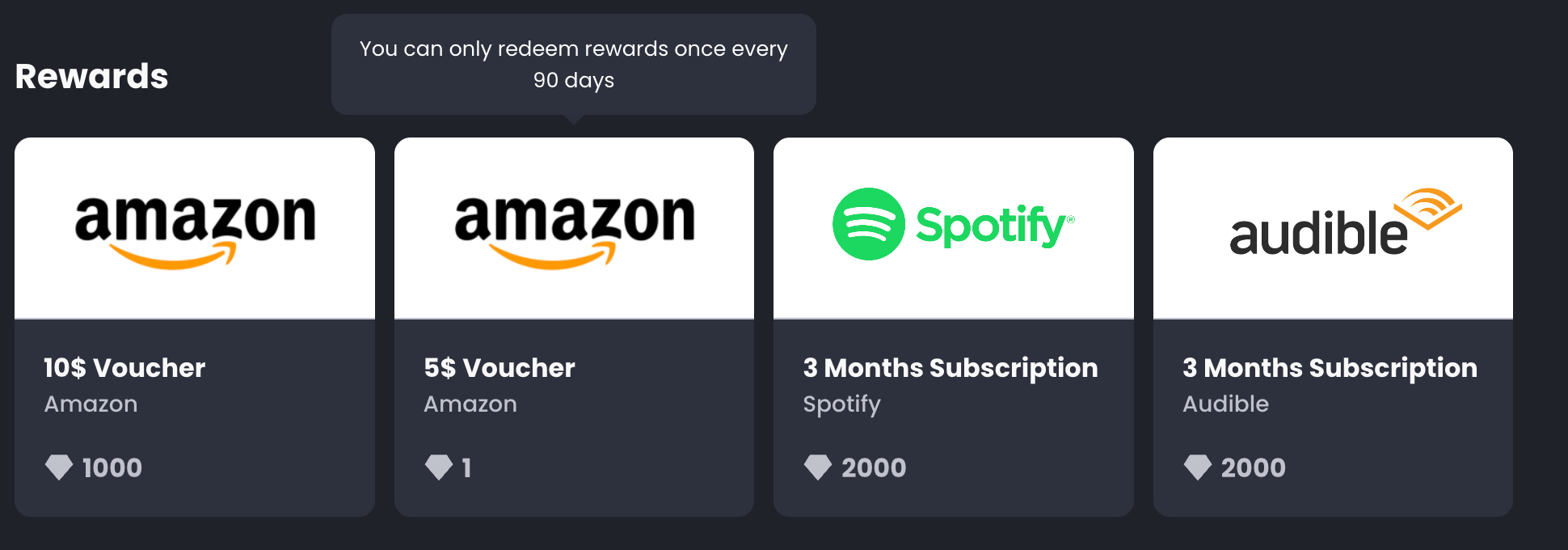
- Rewards may include gift cards, vouchers, and other benefits
Reward Types You Might Find:
- Gift cards for popular retailers
- Spotify vouchers
- Audible subscription
Gift Card Options: When selecting gift cards, you can:
- Choose your country for appropriate currency and retailers
- See the exact value you'll receive (e.g., "$25 Amazon Gift Card")
- View terms and conditions before redeeming
❤️ Donate
The Donate section allows you to contribute your jewels to charitable causes:
How Charity Donations Work:
- You can donate your earned jewels to featured charities
- Each charity shows its mission, impact goal, and current progress
- You'll see how many jewels are needed to make specific impact contributions
- Other users' donations are visible to encourage community participation
Charity Information You'll See:
- Charity Name and Mission: Clear description of the organization and cause
- Impact Goal: What the charity is trying to achieve (e.g., "500 meals for families")
- Progress Bar: Visual showing how close the community is to reaching the goal
- Conversion Rate: How many jewels equal specific impact (e.g., "10 jewels = 1 meal")
- Donors: Profile pictures of other users who have contributed
- Learn More Links: Direct links to the charity's website for additional information
Making Donations:
- Browse available charities
- Click "Donate" on a charity that resonates with you
- Choose your donation amount in jewels
- Confirm your contribution
- See your donation reflected in the charity's progress
Navigation and Features 🧭
Jewels Display
Throughout the Marketplace, you can always see:
- Your current jewels balance in the top right
- How many jewels each item costs
- Whether you have enough jewels for specific items
Search and Discovery
- You can search within Marketplace results using the main search functionality
- The "Marketplace" tab in search results shows all marketplace content
- Browse by category using the filter tabs
Using Your Jewels Wisely 💡
Earning More Jewels
To increase your jewels balance:
- Maintain daily learning streaks
- Complete lessons consistently
- Engage with your For You feed daily
- Participate in any special learning challenges
Spending Strategy
Consider these approaches:
- Professional Development: Use jewels for books, courses, and subscriptions that advance your career
- Giving Back: Donate to charities that align with your values
- Personal Rewards: Redeem gift cards for personal items as motivation for learning achievements
- Balance: Mix between personal rewards and professional development
Redemption Process 🎯
For Rewards:
- Browse available rewards
- Check that you have sufficient jewels
- Click "Get it for [X jewels]"
- Follow country/option selection if required
- Confirm your redemption
- Receive instructions for accessing your reward
For Charitable Donations:
- Browse featured charities
- Read about their mission and impact goals
- Click "Donate" on your chosen charity
- Select your donation amount
- Confirm your contribution
- See your impact added to the charity's progress
Common Questions About Marketplace ❓
Q: Can I redeem multiple rewards at once?
A: No, you can only redeem 1 reward every 90 days. This ensures fair distribution and prevents Jewels hoarding. When a user purchases a reward, they cannot redeem another one for 90 days and the users are informed about this when they try to click again on any reward.
Q: What happens if my order fails?
A: If an order fails, your Bonus Points will be refunded to your account. Check your order status and contact support if you need assistance.
Q: How long does it take to receive my reward?
A: Processing times vary by reward type. Digital gift cards are typically delivered within 24-48 hours, while subscriptions may require additional verification. Check your order status for updates.
Q: Can I cancel an order after placing it?
A: Contact support immediately if you need to cancel an order. Cancellation policies depend on the order status and reward type.
Q: Why can't I redeem a reward even though I have enough points?
A: Check if you've redeemed a reward within the last 90 days. The platform enforces a 90-day waiting period between redemptions. Also verify that the product is currently available.